What running a session actually takes.
The practical side: what you do, what your students do, and what you get afterwards.
A session, start to finish
A typical 75-minute lecture with two rounds. The length is yours to set, anywhere from 30 to 90 minutes.
| Time | You | Your students |
|---|---|---|
| Before class | Pick a case and adjust it. Nothing to install. | Nothing. No install, no account. |
| 0:00 | Start the session and put the six-digit code on the projector. | Open the site on their laptops. |
| 0:05 | Watch the join count climb on your console. | Type the code and their university email. Late arrivals join the same way. |
| 0:10 | Start round 1. Pause, halt an asset, or change the rules while it runs. | Trade against the rest of the room with limit and market orders. |
| 0:45 | Round 2 with new settings, or release news to one cohort. | Trade on what they know, or on what they can read from the book. |
| 1:15 | End the session and download the data. | See their own result, their P&L and score. No ranking. |
| Next lecture | Debrief from the exports: spreads, price impact, who traded against whom. | Find their own trades in the class's market. |
Play the three scenes from the 0:10 row to see what an hour of it feels like from a student’s seat.
Getting started
Your first session
You will not meet the console for the first time in front of a full room. Five steps, from the first call to your first class.
- 1
A call
Your course, your class, and the cases that fit it. Book one.
- 2
Your account
We create your instructor account. Students never need one.
- 3
Teaching notes
Each case comes with notes: the learning goals, how to run it, and questions for the debrief.
- 4
A dry run
We run a test session with you before the real class, so you meet the console before the room does.
- 5
Live support
Someone from our team is reachable during your first session.
In the room
Students need one screen, and it fits a 1280 by 720 laptop. Everything they need to trade is on it at once.
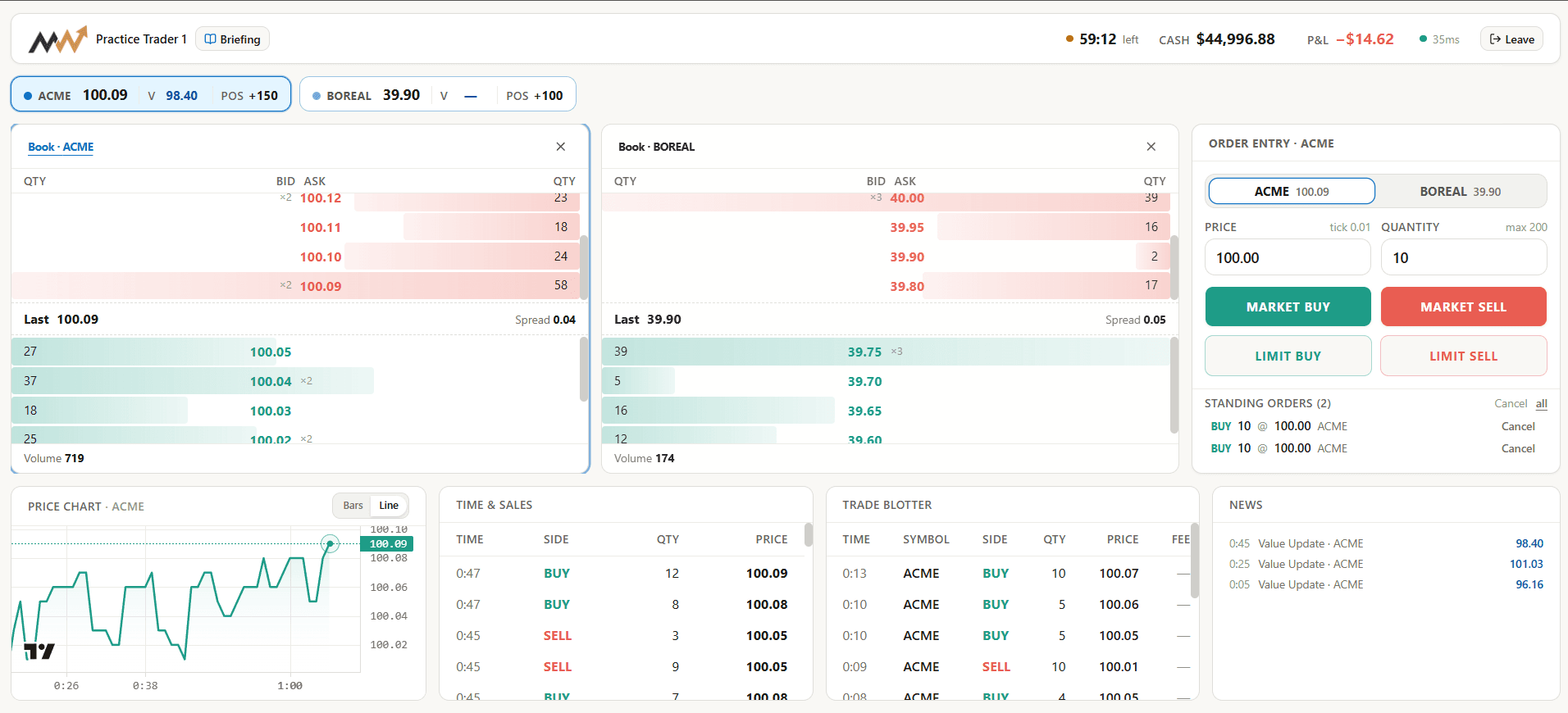
- Time, cash and P&LAlways in view, for the whole session.
- InstrumentsPrice and position, and the student's own value (V) when the case hands one out.
- Order booksTwo books side by side, with depth, spread and the last trade.
- Order entryMarket or limit, buy or sell, and the standing orders to cancel.
- Chart and tapeThe price path, and every print in time and sales.
- BlotterThe student's own fills, with fees.
- NewsValue updates and releases, to everyone or to one cohort.
New to trading screens? The Practice Sandbox is an open market with quoting bots, for the ten minutes before the real case.
Your console
Everything you can do while the market runs is on one screen, and every change you make is logged.
Instructor console
TradingBubbles and Momentum
Round 2 of 3 · 08:42 left
Students
16
Orders
1,284
Trades
412
Release news
Log
- 10:31Position limit raised to ±300
- 10:24Round 2 started
- 10:23News released to all cohorts
- Status and time leftWhether the market is trading, paused or halted, and how long the round has to run.
- Live countsStudents joined, orders sent, trades done. The join count is how you know everyone is in.
- Pause, halt, end roundStop the whole market, halt one asset, or end a round and start the next with new settings.
- Release newsTo everyone, or to one cohort only: the lever for teaching information and adverse selection.
- The logEvery change you make, with the time. The same log is in the export, so the debrief can line it up with the price.
Roles, information and scoring
A case is more than a book. It decides who is in the market, what each group knows, and what counts as doing well. Three examples from the library:
Information
TR3 Multi-Asset Order-Driven Markets
- Asset Exchanger AYou act for a client switching between the two stocks: sell 10,000 STOCK1 and buy 10,000 STOCK2 before the close.
- Asset Exchanger BYou act for a client switching between the two stocks: sell 10,000 STOCK2 and buy 10,000 STOCK1 before the close.
- STOCK1 News DeskYou are a news trader following STOCK1, and may take a position in either stock.
- STOCK2 News DeskYou are a news trader following STOCK2, and may take a position in either stock.
- Prop TraderYou are the desk's proprietary trader, the only one in the room, working the relative value of the two stocks.
Private values
TR1 Genie Bottles — Order-driven Markets
- Trader Type 1You value a bottle most of the five types.
- Trader Type 2You value a bottle above the opening price and below type 1.
- Trader Type 3Your utility starts at the bottle's opening price.
- Trader Type 4You value a bottle below the opening price and above type 5.
- Trader Type 5You value a bottle least of the five types.
Execution
LT2 Orders in Illiquid Markets
- SellerYou are the seller. You sell 20,000 THIN.
- BuyerYou are the buyer. You are short 20,000 THINB and buy it back.
Scoring and grading
Each case sets how students are scored, or whether they are scored at all. At the end of a session every student sees their own result, their P&L and score, and nobody else’s. For graded sessions you can restrict a session to a list of enrolled addresses, and the export has each participant’s cash, equity and score.
The data
Every session downloads as one bundle: six datasets, the metrics as analytics.json, and a README that explains every column.
| File | What is in it | Use it for |
|---|---|---|
| Participants | Cash, equity, score, role | Grading, and results by cohort |
| Executions | Every print, side and fees | Who traded against whom, and price impact |
| Quotes (BBO) | One row per top-of-book change | Spreads and depth across the session |
| Order lifecycle | Fills, cancels, rejections | Queue behaviour: who waited, who cancelled |
| Event log | Halts and parameter edits | Lining up your interventions with the price |
| Inventory paths | Position steps with held time | Risk taken, and how long positions were held |
Session results
Bubbles and Momentum
Peak: 17% over the fundamental, 27 minutes in.
P&L by cohort
- Fundamental traders+1,240
- Momentum traders−1,860
Practical details
- Students need
- A browser and the code
- Devices
- Laptops. Fits a 1280 by 720 screen.
- Room
- Any lecture hall with Wi-Fi and a projector
- Class size
- 8 to 85 in a live lecture; load-tested past 200
- Session length
- 30 to 90 minutes
- Dropped connection
- Rejoin the same seat, positions intact
- Export
- Six CSV datasets, metrics and a README
- Network
- Just an internet connection: the university's Wi-Fi or a mobile hotspot
Questions instructors ask
What do students need?
A laptop with a current browser, the session code, and their university email. Nothing to install and no account to create. The trading screen fits a 1280 by 720 display.
How many students can join one session?
The largest we have run in a real lecture is 85 students, all in one market rather than split into parallel rooms. Beyond that we have load-tested past 200, though not yet with a class in the room. Each case states the class size it is written for, and bots can be added to any case, so a small class still gets a book worth trading against.
What happens if a student's Wi-Fi drops?
They rejoin with the same code and email and land back in the same seat, with their cash and positions intact. The market keeps running for everyone else, and a server restart does not end a running session.
Do students see each other's results?
No. At the end of a session each student sees their own P&L and score, and there is no ranking on screen. What you show the class in the debrief is up to you.
Can I grade with it?
If you want to. Each case sets how students are scored, or whether they are at all, and the export includes every participant's cash, equity and score. For graded sessions you can restrict a session to a list of enrolled addresses.
Do cases come with teaching notes?
Yes. Each case comes with notes for the instructor: the learning goals, how to run it, and questions for the debrief.
Can I change a case, or write my own?
Yes. Start from any preset, change the assets, matching, fees, limits, what students can see and how they are scored, and save it to your own library. See the cases.
Can students practise before a graded session?
Yes. The Practice Sandbox is an open market with quoting bots, for learning the screen in the ten minutes before the real case.
Does it work with Moodle, Canvas or our LMS?
No integration is needed. You give students the session code, they enter it, and they are in under a username of their choice. There is nothing to set up in your LMS.
Where is the data kept? Is it GDPR-compliant?
Students are identified only by the email they type in, and there are no analytics or advertising trackers. We host on Railway, with the servers and the database in Amsterdam, in the EU. Student data is kept for 30 days, and you can download it for grading and research before then; we keep it longer only if the contract says so. The details your IT department will ask for are on Security and data.
What does it cost?
It is priced per institution. Tell us the course and the class size on the call and we will send you a quote.
For your IT department
Approving software for your course?
Identity, storage, hosting and tracking, written for the people who sign off on it.
Security and dataNext step
Ready to try it?
A short call: we run a live market with you and pick the cases that fit your course.
Get started